Disclaimer / Ethical Use Statement
This content and examples are for educational, research, and ethical cybersecurity purposes only. The Proof of Concept (PoC) code and vulnerability tests shown here should not be used to cause unauthorized access or damage.
The author disclaims any legal, financial, or criminal liability arising from the unauthorized application of this content to third-party systems. Users are responsible for testing these materials only on their own systems or in environments where explicit permission is granted.
This content is intended to raise information security awareness and encourage secure software development practices.
In-memory attacks are difficult to detect. However, memory data provides some of the most important clues about what attackers are doing inside. In this article, I plan to explain how to perform a Volatility3 memory dump. Memory forensics is a type of analysis that uses the system’s RAM blocks to gather information about running processes, network access, injected code, and traces of attackers.
You can install Remnux Linux for this, but Remnux may not has Volatility3, so you might want to try installing Volatility 3 manually, or you can install any Linux distribution and try installing Volatility 3 manually there as well.
I set up an isolated malware testing environment, ran a malware sample there, and chose to dump and analyze the memory during the process.
First, confirm if Vol3 is installed.
vol3 --versionWindows.info Plugin
Next, let’s try to get some general information about the memory dump file. OS information, etc.
vol3 -f malicious2.vmem windows.info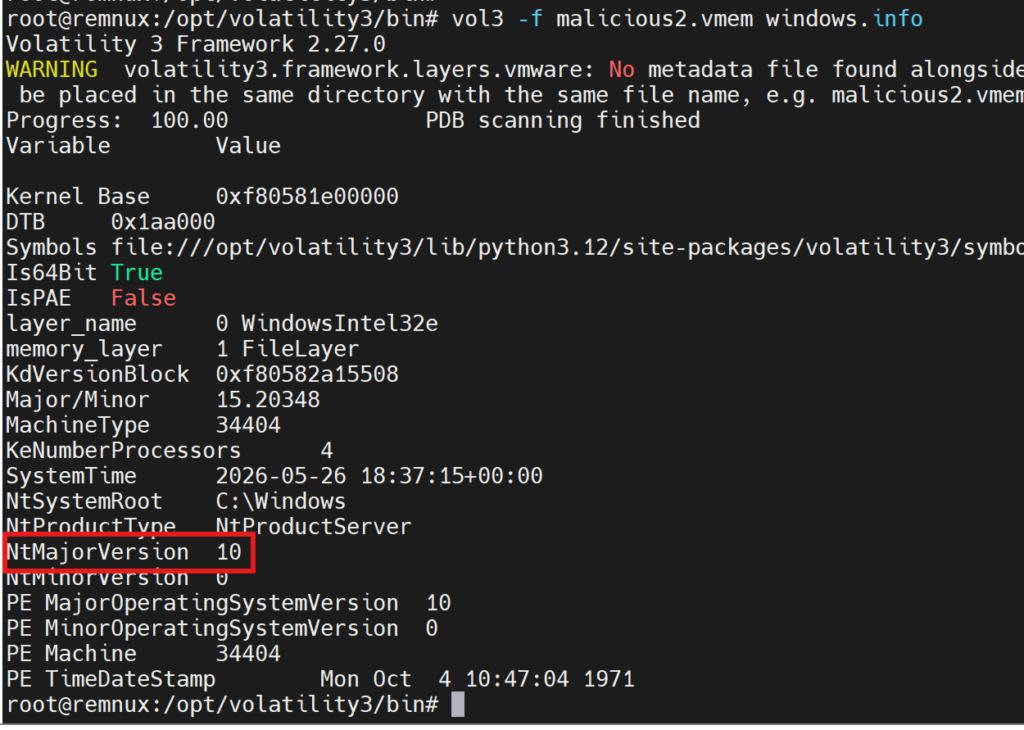
Now let’s check which processes were present when the memory dump was taken.
vol3 -f malicious2.vmem windows.pslist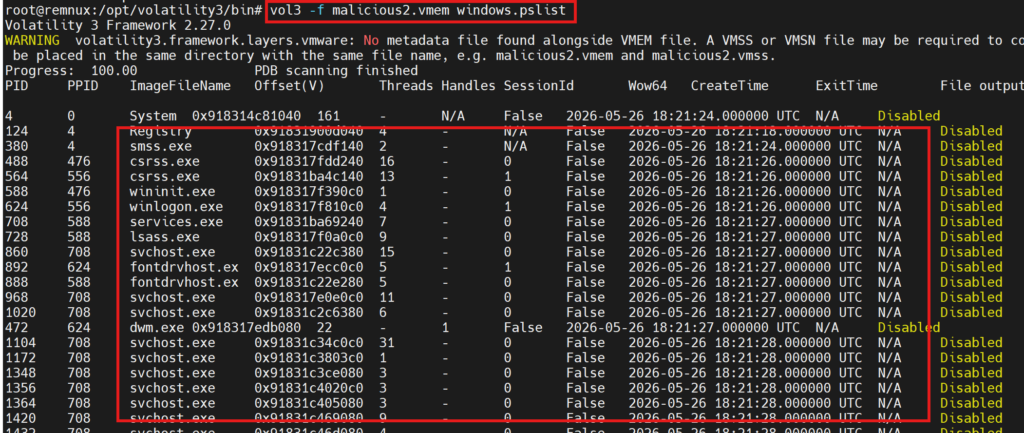
As we continue examining the processes, we notice an already suspicious name, and the wow64 result is true. This indicates that it’s a process designed for 32-bit, which increases suspicion.

The pslist parameter reads the list of active processes, but rootkits can manipulate this list. However, Psscan searches for process structures in physical memory. If there are processes that are not in pslist but do not terminate in psscan, this could be a sign of a rootkit.
vol3 -f malicious2.vmem windows.psscan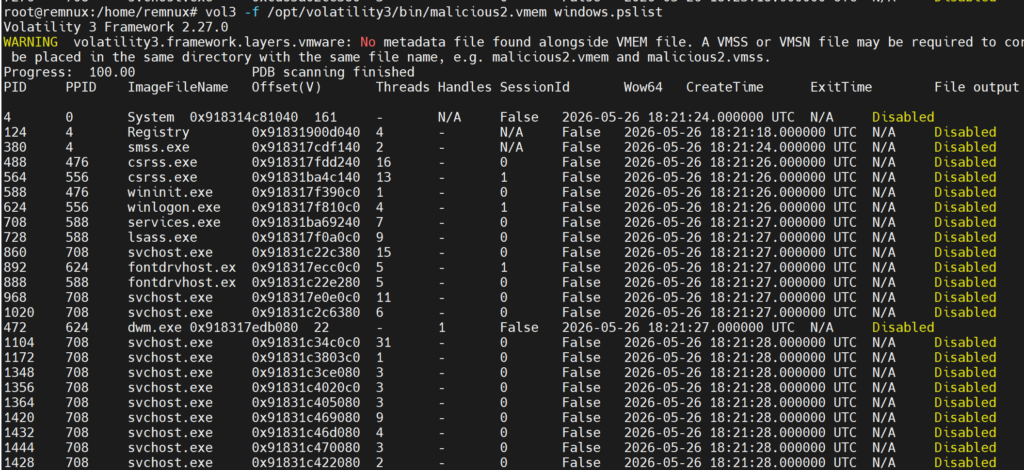
Here, some processes appear more frequently than in the pslist, but all of them have terminated.
Cmdline Plugin
Now let’s try to see the command lines where processes are called using the cmdline parameter.
vol3 -f malicious2.vmem windows.cmdline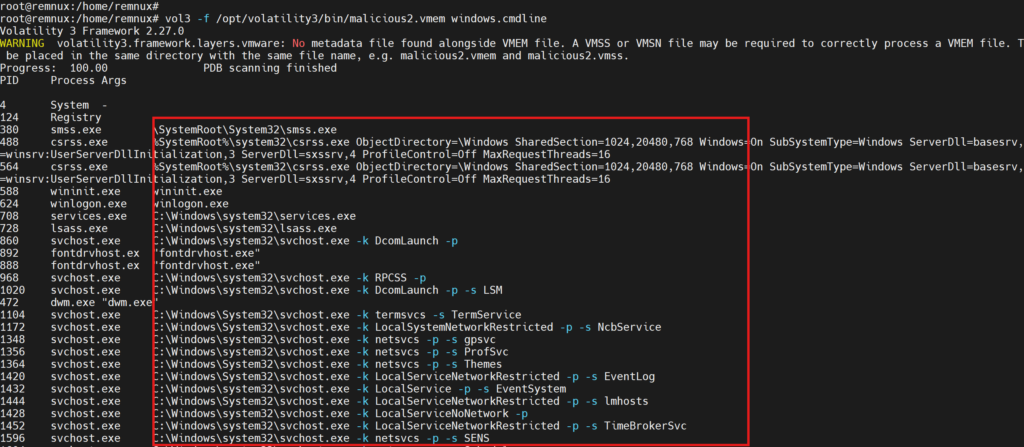
Here are some indicators that we could call red flags:
- -enc or -EncodedCommand
- Working from Temp or Appdata
- a structure like
powershell -nop -w hidden -c ... - SHA256 hash structure as file name
Our finding is actually the filename here, because the filename is part of the Hash pattern.

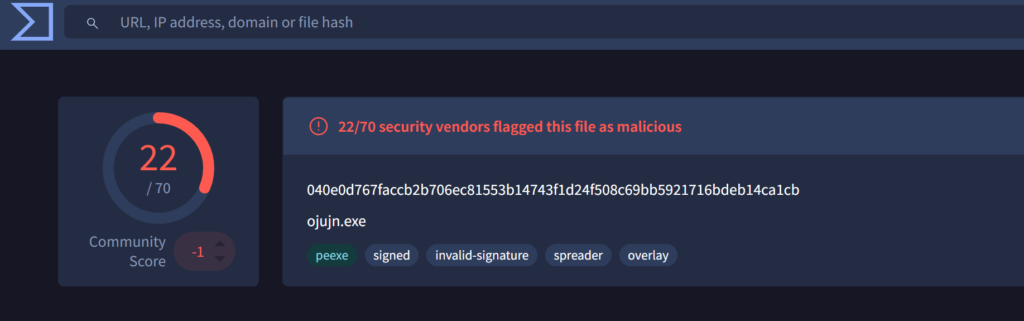
“C:\Users\Administrator\Downloads\040e0d767faccb2b706ec81553b14743f1d24f508c69bb5921716bdeb14ca1cb.exe”
When we checked on VirusTotal, we could also see that it was marked as malicious by many vendors.
Malfind Plugin
This scans the memory parts of each process and then finds any suspicious combinations.
vol3 -f malicious2.vmem windows.malfind
There are a lot of red flags here.
- MZ header is present. 4D 5A is a PE file injected into memory.
- Page_Execute_Readwrite – This is both writable and executable. It’s a classic sign of an injection and is rare.
- CommitCharge:238 – This is also 238 pages -> 950 kb hidden PE
Dlllist Plugin
The dlllist argument shows the list of DLLs loaded by the process. Since our main suspect is the process named 040e0d767faccb, we are continuing our investigations using its process ID.
vol3 -f /opt/volatility3/bin/malicious2.vmem windows.dlllist --pid 8576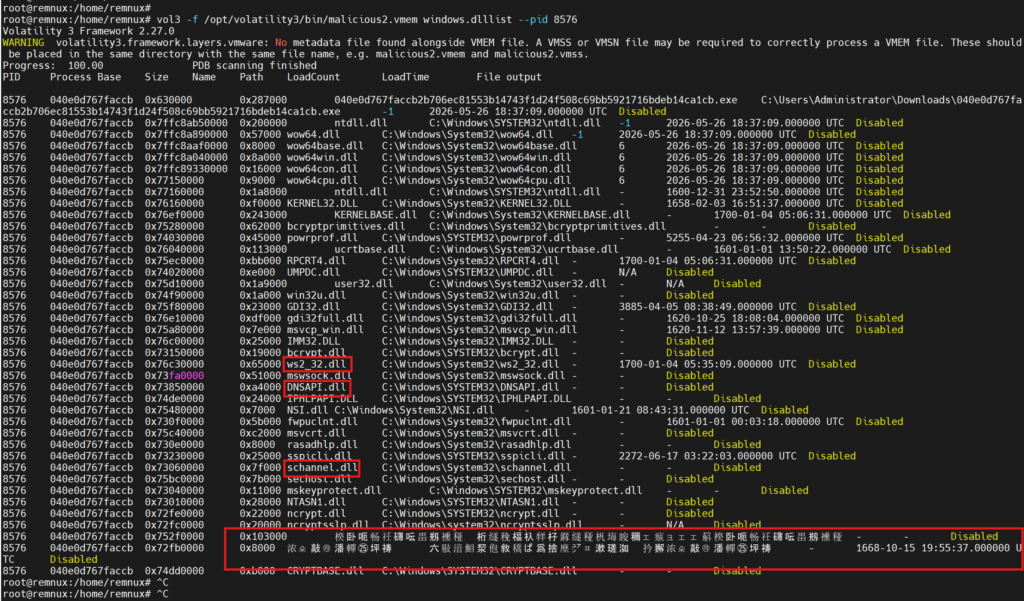
There are a few red flags here too.
- 0x752f0000 楑卧呃畅祍礴.. – It’s not loading from the disk and its name is corrupted.
- 0x72fb0000 浓朵敲㉱潘… – Similarly, the load time is an old date like 1668.
These two could be evidence of reflective DLL injection.
Additionally, some DLLs that are used and require attention during the analysis are:
- ws2_32.dll – For network connections.
- schannel.dll – For TLS/SSL encrypted communication.
- DNSAPI.dll – DNS queries.
Netscan Plugin
This scans the memory dump for network connection structures. It finds socket and connection objects stored in memory. It searches for the following structures:
_TCP_ENDPOINT
_TCP_LISTENER
_UDP_ENDPOINT
vol3 -f /opt/volatility3/bin/malicious2.vmem windows.netscan.NetScan
172.67.199.188 is a cloudflare IP address. This means the attacker may have hidden the real C2 server behind a Cloudflare proxy. This is an indication of a domain fronting technique.
PE Dump ve Further Analysis
These commands are used to remove the suspicious process from RAM and analyze it.
# PEDump (base adresi dlllist'ten)
vol3 -f /opt/volatility3/bin/malicious2.vmem \
  -o /tmp/dump_8576 \
  windows.pedump.PEDump --pid 8576 --base 0x630000
Our next goal is to extract ASCII strings from the binary data and capture readable data that is not obfuscated. Also we can filter the suspicious IOC’s with grep -iE
- Do you have a C2 server?
- Memory Allocation
- Is thread inject available?
- Is it writing to another process’s memory?
- Is Lolbin being used?
- Is there a Metasploit plugin?
- Is there a Cobalt Strike Beacon?
ls /tmp/dump_8576/

sha256sum /tmp/dump_8576/*

strings -n 6 /tmp/dump_8576/* | grep -iE \
  "http|https|cmd\.exe|powershell|VirtualAlloc|\
  CreateRemoteThread|WriteProcessMemory|\
  beacon|meterpreter|[0-9]{1,3}\.[0-9]{1,3}\.[0-9]{1,3}\.[0-9]{1,3}"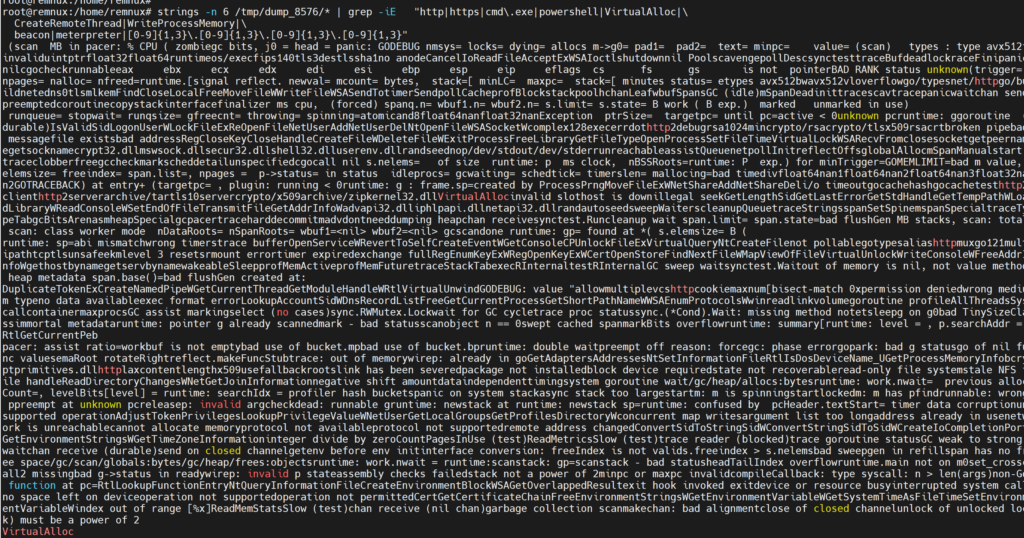
Upon closer examination, we see the following:
Malware written in Go
->runtime: goroutine
->go/types
-It can establish HTTP/2 and TLS encrypted connections, meaning it can send C2 traffic in encrypted form.
->net/http
->http2client
->http2server
->crypto/tls
->tls10server
->WSASocketW
->WSASendTo
->WSARecvFrom
->GetAddrInfoW
-It contains dangerous Windows APIs.
->VirtualAlloc -memory allocation(shell code injection)
->CreateNamedPipeW – Secret communication between processes
->OpenProcess – başka process’e erişim
->DuplicateTokenEx – token theft privilege escalation
->AdjustTokenPrivileges – priviledge escalation
->LookupPrivilegeValueW – priviledge inquiry
->LogonUserW – identitiy verification
-User and Network Management
->NetUserAdd – creating a new user
->NetUserDel – deleting user
->NetShareAdd – creating a network share
windows.malware.ldrmodules.LdrModules Plungin
This plugin checks and compares whether the modules within the process are registered in the PEB loader list, whether they are in memory, and whether they have been initialized. It provides important clues about whether malicious behavior such as process hollowing is occurring.
vol3 -f /opt/volatility3/bin/malicious2.vmem windows.dlllist --pid 8576
0x400000 – False/False/False/NA – So it could be PE that was secretly injected.
0x630000 – True/False/True – The main malware exe and init are omitted.
Specifically, the 0x40000 symbol appears to be an indication of process hollowing.
Conclusion
As seen, in-memory attacks can be extremely silent and dangerous. Classical AV approaches are often insufficient to prevent them. In these types of attacks, the malicious code often doesn’t touch the disk; it can maintain its presence by injecting itself into the memory of a legitimate process.
It should also be noted that a layered protection structure must be designed to detect and stop these complex attack types. Layered protection approaches such as EDR solutions, memory scanning, and behavioral analysis significantly reduce the devastating consequences of these types of attacks.
IOC Information on the Malware
The IOC information resulting from the review is as follows:
File Hash – 040e0d767faccb2b706ec81553b14743f1d24f508c69bb5921716bdeb14ca1cb
C2 IP – 172.67.199.188
C2 Port – 443
Leave a Reply